Resharding Postgres
Work in progress
This feature is in active development. Support for resharding with logical replication was started in #279 and received major improvements in #784.
Resharding changes the number of shards in an existing database cluster in order to add or remove capacity. To make this less impactful on production operations, PgDog's strategy for resharding is to create a new database cluster and reshard data while moving it to the new databases.
To make this an online process, with zero downtime or data loss, PgDog hooks into the logical replication protocol used by PostgreSQL and reroutes messages between nodes to create and update rows in real-time.
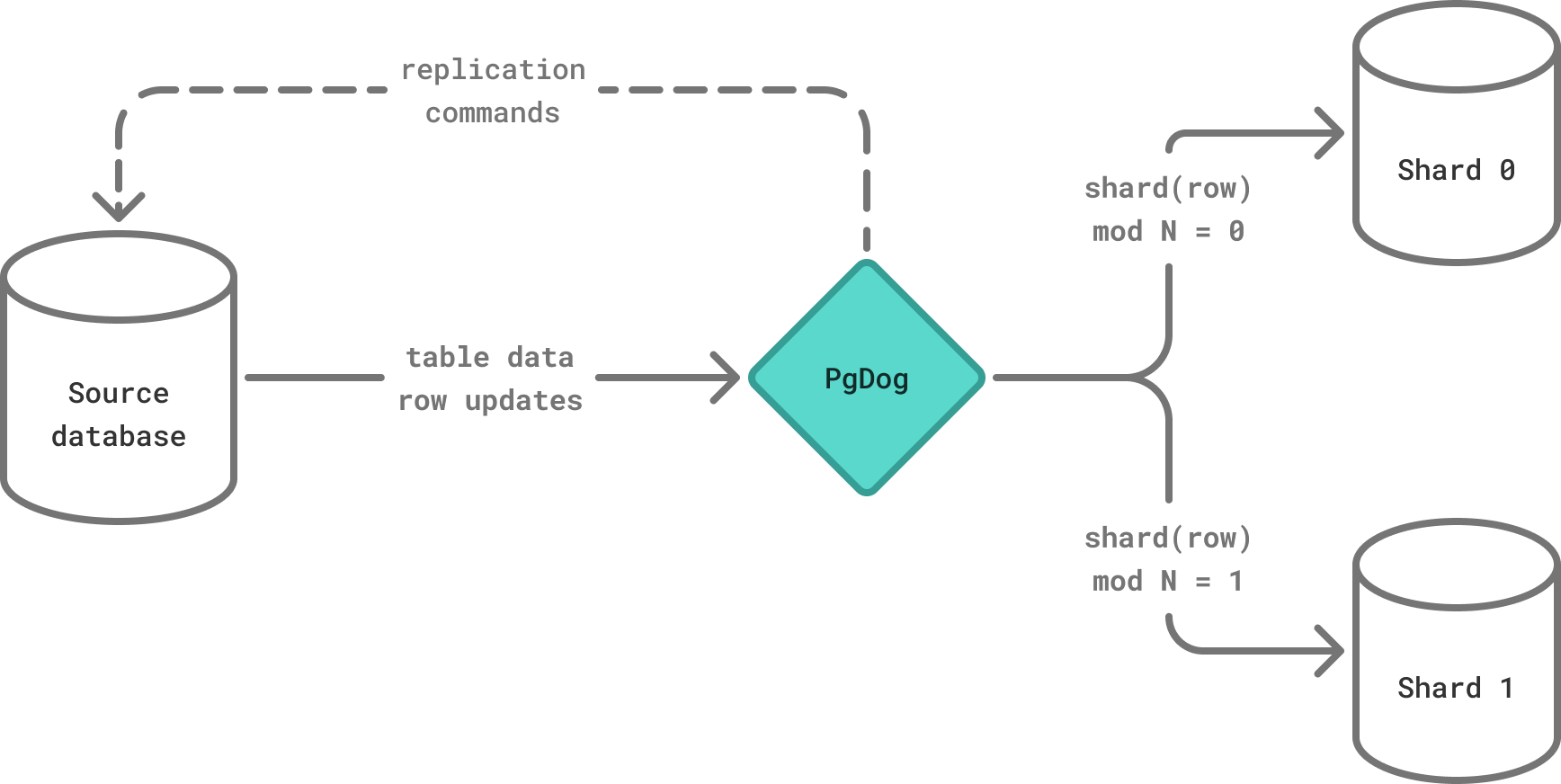
Resharding process
The resharding process is composed of four independent operations. The first one is currently the responsibility of the user, while the remaining 3 are automated by PgDog:
| Operation | Description |
|---|---|
| Create new cluster | Create a new set of empty databases that will be used for storing data in the new, sharded cluster. |
| Schema synchronization | Replicate table and index definitions to the new shards, making sure the new cluster has the same schema as the old one. |
| Move & reshard data | Copy data using logical replication, while redistributing rows in-flight between new shards. |
| Cutover traffic | Make the new cluster service both reads and writes from the application, without taking downtime. |
While each step can be executed separately by the operator, PgDog provides an admin database command to perform online resharding and traffic cutover steps in a completely automated fashion:
The <source> and <destination> parameters accept the name of the source and destination databases respectively. The <publication> parameter expects the name of the Postgres publication for the tables that need to be resharded.
RESHARD returns a task_id and runs in the background. You can track its progress with SHOW TASKS, and stop it with STOP_TASK <task_id>. When RESHARD is used, traffic cutover happens automatically as the final step.
Running the steps manually
Instead of RESHARD, you can run the process one step at a time. This gives you control over when traffic is cut over. Each step can be run either as an admin database command or as a pgdog CLI command:
| Step | Admin database | CLI |
|---|---|---|
| Schema sync | SCHEMA_SYNC <phase> <source> <destination> <publication> |
pgdog schema-sync ... |
| Move & reshard data | COPY_DATA <source> <destination> <publication> |
pgdog data-sync ... |
| Cutover traffic | CUTOVER [<task_id>] |
admin database only |
The two run differently:
- Admin database commands run as background tasks inside the running PgDog. They return a
task_idimmediately, are tracked withSHOW TASKS, and are controlled withSTOP_TASKandCUTOVER. - CLI commands run as a separate, one-off
pgdogprocess in the foreground: they block until the operation finishes and are stopped withSIGINT(orSIGTERM). They do not appear inSHOW TASKS.
Unlike RESHARD, the manual path does not cut over automatically: the data move copies the data and keeps streaming changes indefinitely, and you switch traffic explicitly with CUTOVER.
Traffic cutover
Traffic cutover requires careful synchronization to avoid data loss and a split-brain situation. The RESHARD command supports this for single node PgDog deployments only. The Enterprise Edition provides a control plane, which supports traffic cutover with multiple PgDog containers.
Terminology
| Term | Description |
|---|---|
| Source database | The database cluster that's being resharded and contains all data and table definitions. |
| Destination database | The database cluster with the new sharding configuration, to where the data will be copied from the source database. |
| Logical replication | Replication protocol available to PostgreSQL databases since version 10. |
Next steps
Schema sync
Synchronize table, index and other schema entities between the source and destination databases.
Move data
Redistribute data between shards using the configured sharding function. This happens without downtime and keeps the shards up-to-date with the source database until traffic cutover.